
Frequently Asked Questions: Volunteer Workshop
Getting Started
It is helpful to read through the whole RAP sheet to organize the cases in chronological order. To understand how to differentiate cases, check out other FAQ answers.
It is useful to plot the chronology of the individual before starting the "RAP Analysis" step.
Please try to copy and paste info - or slow down when retyping - to ensure precision (i.e. with case #).
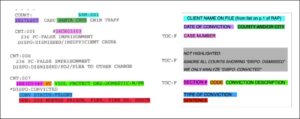

- Four asterisks define a case’s start + finish
- Each case may have one or more convictions
- Often, several counts have no conviction because the client agreed to a plea deal, with one conviction
-
- Yellow = conviction. This is the key info!
-
- Orange = custody notes from Department of Corrections Often more detailed than court record, this is supplementary information, not a separate conviction. Can be connected to yellow cases by matching the case number.
-
- Green = already dismissed
- Purple = conviction status reduced from felony to misdemeanor. Choose "felony previously reduced to a misdemeanor" as the Type of Conviction.
No.
Not highlighted = not pertinent!
No conviction = no expungement needed.
Orange highlights = custody notes. They are often more detailed than yellow info (court notes), and provide updated/supplementary information. Sometimes it is just the same information.
Orange custody notes can be connected to yellow court notes by matching the case number.
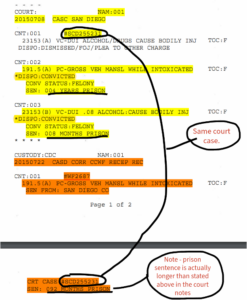
Many times, defendants enter into plea deals. If they are charged with several counts, the prosecutor may drop several of them if the defendant pleads guilty to one of them. Thus, sometimes only one count has a conviction.
The Online Portal
After clicking into a Client Profile, click "+ Add New Case" on the left side - it is a green button.
After you add and save the case information, click "+ Add Conviction". This is in the middle of the screen, to the right of the "Overview" tab.
Yes, add each conviction individually within the broader "header" of the case:
- Many cases have multiple counts and/or convictions
- Within the case, add in every conviction separately
- There is a button to add another conviction when you are done with the first
- If you are unsure of the county, use google
- It’s okay to check “Unsure” if you’re unsure of the court info
- Check the courthouse identifier guide on your Volunteer Guide sheet
The sentence applies to each conviction in the case.
Analysis Step
To do one conviction at a time, navigate to the conviction, and click the green "+ Analyze Conviction" button at the bottom of the page.
To do several convictions, click "Analyze Convictions" on the top. This is a green button on the right side, next to the "Populate Forms" button which is greyed out.
Yes. A distinct analysis is needed for each conviction.
If a conviction status was reduced, it will have been highlighted in purple.
Final Steps
After running the analysis, Save + confirm.
If you have completed this for every conviction for every case, then:
- Go to the Client Profile
- Edit (pencil icon next to "Profile")
- Scroll down and set Portal Status to "Analysis Ready for Review".
- Write any relevant notes or questions for us in the comments section - scroll down and click "+" under notes.
- If anything is odd, ask us about it!
- Please write a comment in the notes section.
- It’s okay to make a mistake. Our lawyers will review all of your work.
If you are interested in working 1:1 with a student on their petition/declaration, reach out to us at Info@AccessProjectCA.org.
More info on declarations can be found here.
Please consider making a donation to our organization.
Definitions
- Felonies: crimes for which prison is an available sentence
- Misdemeanors: crimes for which jail time up to one year is an available sentence
- Infractions: "citation" crimes for which fine or short jail time are available sentences
- Probation: can be the sentence for any conviction (even homicide!); often paired with jail time of less than one year or fine
- Jail time alone: Jail < 365 days for misdemeanor (can be paired with fine) Jail >365 days = felony jail sentence
- Prison: Will say prison! Usually accompanied by a custody note.
A case is composed of one or more charges that accuse a defendant of breaking the law in some way.
A conviction means that the defendant was found guilty of a specific charge. Not all cases end in convictions.
"Felony jail" refers to incarceration for some felonies that prior to Realignment would have been served in prison.
A jail sentence of less than 1 year, imposed along with probation, is not a felony jail sentence.
Probation
The probation period begins on the date of conviction (it is served in conjunction with incarceration).
Thus, you can calculate the precise end date: [beginning date] + [duration of probation].
Was probation successfully completed?
YES if:
- No violations, modifications, or terminations
- No yellow highlighted convictions/incarcerations that occurred before the end date
- Probation was terminated early pursuant to 1203.3 PC (beware of the language “early termination” or “early dismissal” it rarely means probation was successful)
- Arrest that does not lead to conviction is okay (due process)
NO if:
- Probation violated, modified or reinstated
- “PROB VIOL/REV AND/OR REINSTATE W/SEN MOD”:
For “Probation terminated,” it depends on what follows.
• Not revoked unless followed by prison or > 365 days jail
• Probation revoked and/or custody note for PRISON = probation revoked
Misc
Vehicle Code infractions cannot be expunged. See PC 1203.4a(d)(3).
To determine this you need to search the convictions on the RAP sheet that precede this one to see if the applicant had a prior conviction for a superstrike (the crimes listed on the dropdown). Superstrike convictions are always felonies and and almost always result in very long prison sentences. The answer to this question is almost always no.